
Social engineering is the practice of manipulating a person, not a computer, into handing over access, credentials, or money. It works because it targets trust and urgency instead of a firewall. Most people picture a hacker cracking passwords in a dark room, but the real story is usually a lot more boring than that: someone tired, in a hurry, doing what looks like a normal request. Below, you’ll find the main types of social engineering attacks, what they look like at a small or mid-size business, and the specific steps your team can take to defend against them.
What Is Social Engineering?
Social engineering is psychological manipulation used to get someone to bypass their own security judgment. Technical hacking targets code and infrastructure. Social engineering targets people instead, which makes it cheaper to run and effective against a company of any size, not just large enterprises with big security budgets.
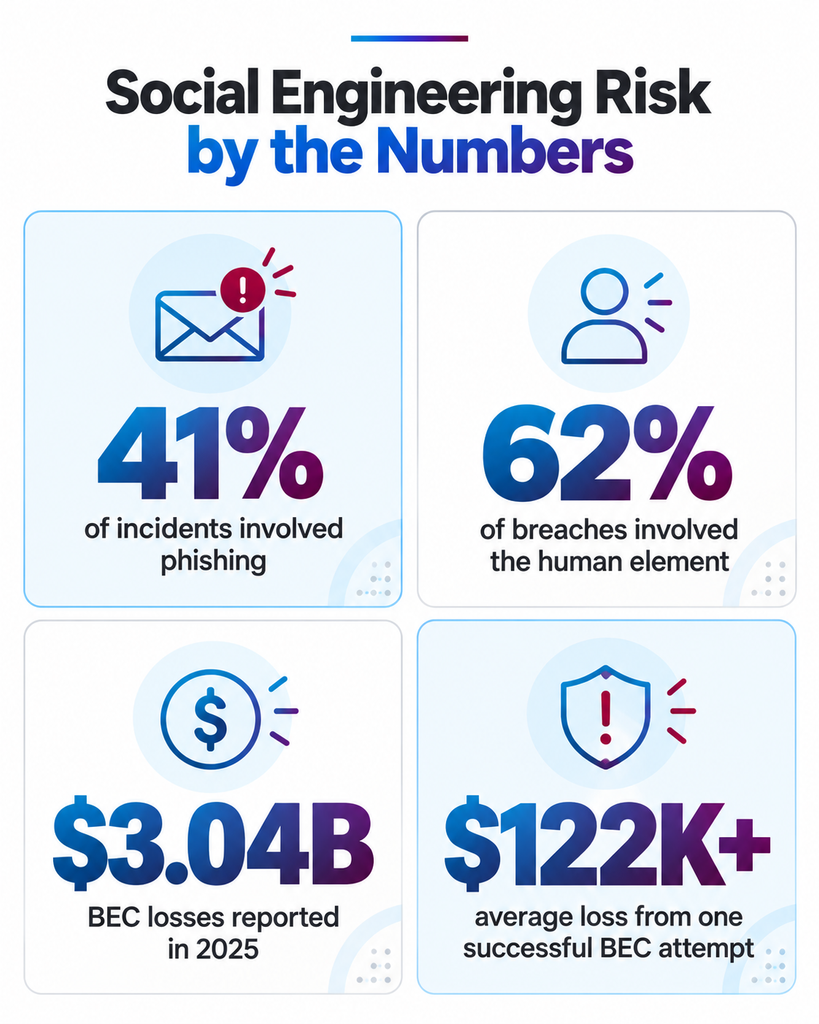
IBM’s X-Force Threat Intelligence Index identified phishing in 41% of incidents, and ISACA has called social engineering the leading cause of network compromise. Attackers don’t need to break your encryption if they can just ask nicely, or convincingly enough, for someone to open the door themselves. That’s what keeps this such a persistent problem even at companies that have invested heavily in layered defenses.
Why Social Engineering Works on Even Careful Employees
Most breaches aren’t sophisticated. They just target people instead of firewalls. Attackers lean on a handful of triggers that work on almost everyone: urgency, authority, and a basic desire to be helpful.
Maybe it’s a fake invoice marked overdue, or a text from “the CEO” needing gift cards fast before a flight. Neither one requires advanced hacking, it just requires someone busy enough to skip the second look. The 2026 Verizon Data Breach Investigations Report found that 62% of breaches involved the human element.
The same report flagged pretexting as the fastest-growing pattern: attackers working inside legitimate-looking business threads through vendor impersonation and account takeover rather than an obvious phishing lure. That’s where the data points now, toward attacks that look like a normal part of your workday.
9 Types of Social Engineering Attacks To Know
Nearly every real-world incident traces back to one of these patterns, and most attacks blend more than one.
1. Phishing
Mass emails or messages impersonating a trusted brand or vendor to steal credentials or deliver malware. Still the single most common entry point.
2. Spear Phishing
A phishing email personalized to one employee using details pulled from LinkedIn or your own website, which makes it far harder to spot than a generic blast.
3. Whaling
A spear phishing attack aimed at executives or finance staff who can approve wire transfers, usually the most heavily researched version an attacker will run.
4. Vishing and Smishing
Phone calls and text messages, including AI voice cloning of a real executive’s voice, built to create urgency and skip email security tools entirely.
5. Pretexting
A fabricated scenario, like posing as IT support or a new vendor, used to extract credentials or account details over several interactions rather than one message.
6. Baiting
A tempting offer, a “found” USB drive, a free download, designed to get an employee to install malware on their own.
7. Quid Pro Quo
An attacker offers a service, like fixing a support ticket, in exchange for login credentials or remote access.
8. Tailgating
Physically following an employee through a secured door without a badge, often while posing as a delivery driver or contractor.
9. Business Email Compromise (BEC)
A compromised or spoofed executive email account requests a wire transfer or payroll change. It’s the costliest category by dollar loss.
According to the FBI’s 2025 IC3 report, BEC losses reached $3.04 billion in 2025. A single successful BEC attempt averages more than $122,000 in losses, which is why finance and accounts payable teams are worth extra scrutiny. Phishing losses climbed 208% year over year to $215.8 million in the same report. Baiting and phishing also commonly deliver ransomware, so a social engineering incident rarely stays contained to one type.
What Social Engineering Looks Like at a Small Business
Most write-ups on this topic lean on celebrity-scale examples: a CEO whaling attack at a Fortune 500 company, a Nigerian prince email scam from a decade ago. That’s not particularly useful if you’re running IT for a 40-person accounting firm.
At a company your size, it looks smaller and faster than that. An “urgent” email from the “owner” asks your office manager to buy gift cards for a client gift, today, before a flight. A spoofed vendor invoice arrives with updated bank details, timed for the end of the month when accounts payable is already moving fast.
A caller poses as your IT provider and asks an employee to “verify” their password before a scheduled update that was never scheduled at all. Attackers target small businesses specifically because they assume, often correctly, that training and verification steps are thinner than at a large enterprise. If your team hasn’t sat down and thought through what to ask before choosing an IT security provider, these are exactly the gaps that show up first.
Warning Signs Your Team Is Being Targeted
A few red flags cover most of what your team needs to catch in the moment. Unexpected urgency or pressure to skip a normal step is the biggest one. A request to change payment or banking details close to a deadline is another, especially paired with a sender address that’s close but not quite right.
Requests to keep something secret from a manager or coworker deserve the same suspicion. No legitimate vendor, executive, or IT provider will ever ask for a password or a one-time MFA code over email, chat, or phone. If someone asks for either, that’s the request itself, not the excuse attached to it, that should end the conversation.
Build this into your next round of cybersecurity planning if it isn’t there already.
How To Defend Your Team Against Social Engineering
Defense here is a mix of people, process, and technology. No single layer covers everything on its own.
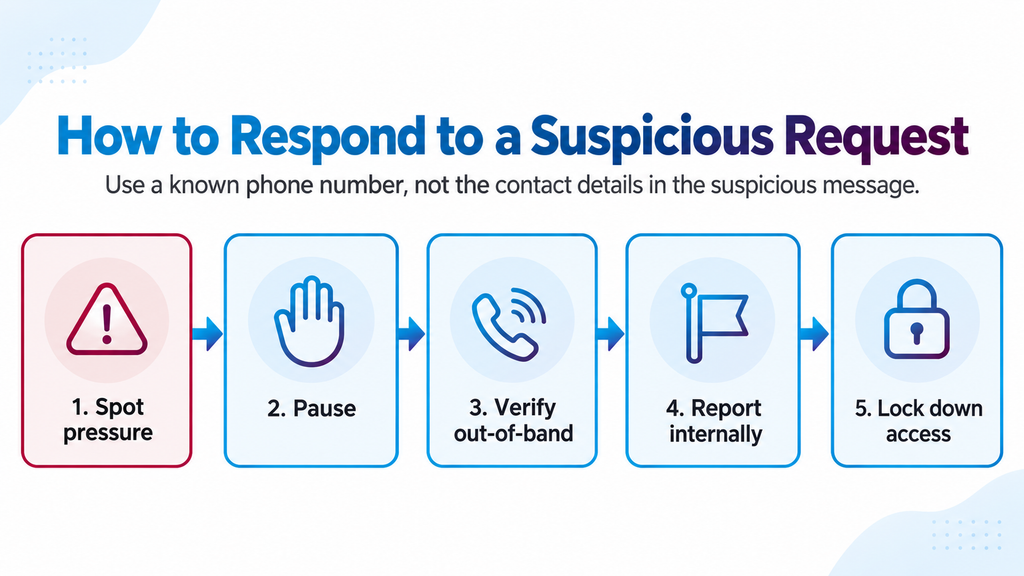
Start with multi-factor authentication on every account, and make it mandatory rather than optional. CISA recommends going a step further with phishing-resistant FIDO authentication where you can, since it blocks a fake-site login attempt even after an employee has already clicked the bad link. Add a required out-of-band verification step for any payment, banking, or credential change request: a phone call to a known number, never the number listed in the suspicious message itself.
Leadership needs to mandate these controls company-wide rather than hoping employees remember a training session from six months ago. CISA’s own guidance is blunt about this: mandate technical controls. Don’t rely on faith that people will follow the rules under pressure. Pair that with ongoing awareness training and a tabletop drill or two a year, so your team has practiced the response before a real attempt shows up in their inbox.
If your team needs this built and monitored rather than pieced together internally, that’s exactly what our cyber security services are for. It’s the kind of thing that fits naturally under a broader managed IT services relationship too, if you’d rather have one partner own the whole stack.
Frequently Asked Questions About Social Engineering
It’s the practice of manipulating a person, not a system, into giving up access, credentials, or money. It’s the human-targeted counterpart to technical hacking, and it’s often the faster path in for an attacker.
Phishing, business email compromise, pretexting, and vishing or smishing account for most of what businesses actually deal with. The full list above covers the rest.
Phishing is one type of social engineering, delivered by email or message. Social engineering is the broader category, and it also includes phone-based, in-person, and physical tactics like tailgating.
They catch some delivery methods, like known malware or malicious links, but they can’t stop a convincing phone call or an employee willingly handing over a password. That’s why training and verification steps matter alongside the technology, not instead of it.
Watch for the signals covered above: urgency, requests to change payment details, and anyone asking for a password or MFA code. If it feels rushed, slow down and verify before acting.
Three things, together: mandatory MFA (FIDO where possible), a required verification step for payment or credential requests, and ongoing training with practiced drills. If you don’t have this in place yet, talk to our team about what right-sized security looks like for a business your size.