
A cybersecurity risk assessment is the process of finding out what could go wrong with your systems and data, ranking how much damage each scenario would do, and fixing the worst ones first. Most small businesses put this off until something already broke. This post walks through what an assessment covers, the six steps to run one, and whether your team should handle it in-house or bring in outside help.
What Is a Cybersecurity Risk Assessment?
It comes down to three things: finding your assets, finding what threatens them, and ranking those risks by potential damage. That’s it. No exotic tooling required, just a clear look at what you have and what could hurt it.
People often confuse this with a security audit or a penetration test. An audit checks whether you meet a specific standard, like HIPAA or PCI. A penetration test actively tries to break into your systems to see if it can.
A risk assessment usually comes first, since it tells you what an audit should even be checking and where a pentest should focus. Think of it as the planning step that happens before the audit or the test. If your business has never mapped out its security stack, an assessment is the fastest way to find the gaps before someone else does.
Why Small Businesses Need One
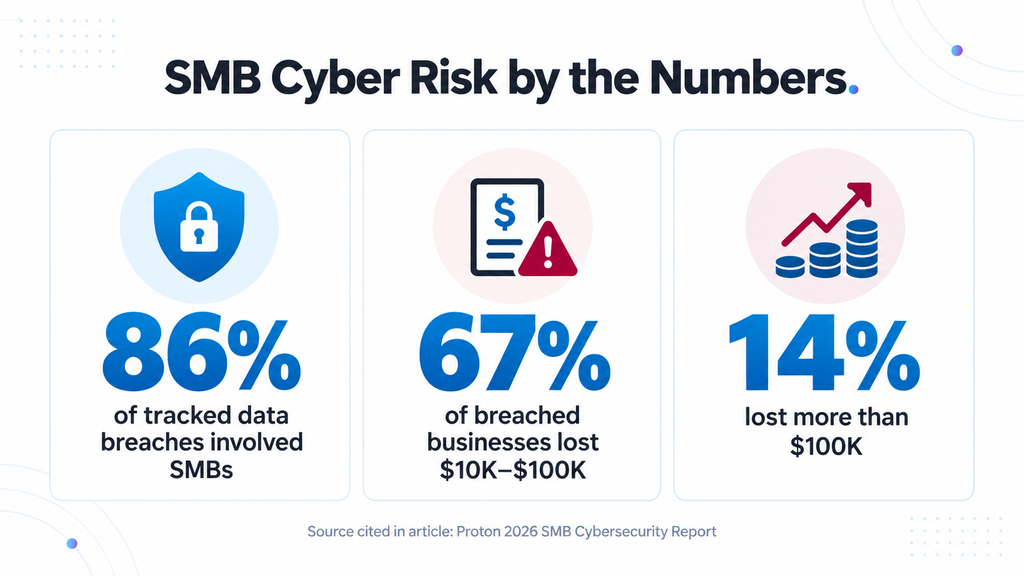
Attackers treat small businesses as an easy, frequent target, and the numbers back it up. SMBs accounted for 86% of all data breaches tracked since January 2025, according to Proton’s 2026 SMB Cybersecurity Report. Of the businesses that got breached, 67% lost between $10,000 and $100,000, and 14% lost more than that.
Most owners assume they’re too small to be worth an attacker’s time. Attackers don’t see it that way. A small accounting firm with weak email security is an easier target than a bank with a full security team, and the payout doesn’t need to be huge to be worth the effort.
Cyber insurance is one more reason to keep this on file: many policies now ask for a documented risk assessment before they’ll pay out on a claim. If your business handles healthcare, legal, or financial data, a documented assessment also supports the compliance requirements your industry already expects.
What Risks Does an Assessment Actually Find?
An assessment usually turns up the same handful of risk categories no matter the industry: phishing emails that trick someone into handing over a password, ransomware that locks up files until you pay to get them back, software that hasn’t been patched in months, and plain human error, like an employee attaching the wrong file or clicking a link they shouldn’t have.
None of these require a sophisticated attacker. Most incidents trace back to an ordinary moment on a Friday afternoon: a tired employee, a decision made in a hurry, or a login screen that looked convincing enough to click. If ransomware defense isn’t already part of your plan, this is usually where an assessment flags it first.
How to Conduct a Cybersecurity Risk Assessment: 6 Steps
Every solid risk assessment follows roughly the same sequence, whether you run it yourself or an MSP runs it for you. This process draws on NIST’s official risk assessment methodology, the framework most of the industry builds from.
1. List Your Assets
Write down what you have: devices, software, data, and systems. Most small businesses underestimate this list. That count covers every laptop, every cloud app, and every spreadsheet with customer data in it, along with the server most owners think of first.
2. Identify the Threats
For each asset, ask what could target it. That includes outside attackers, but also honest mistakes by your own staff and risk introduced by a third-party vendor with access to your systems.
3. Find the Vulnerabilities
This is where the gaps show up: outdated software, weak or reused passwords, no multi-factor authentication, employees who’ve never had security training.
4. Score the Risk
Multiply likelihood by impact. A low-likelihood, high-impact risk, like a natural disaster taking out your office, gets handled differently than a high-likelihood, medium-impact one, like an employee falling for a phishing email. Scoring is what turns a long list of problems into an actual plan.
5. Put Controls in Place
Patch outdated software, turn on multi-factor authentication, and test your backups on a regular schedule. Then train your team on what a phishing attempt looks like, since technology alone doesn’t stop someone from clicking the wrong link. Match every fix to the highest-scored risks first.
6. Document and Revisit
Write down what you found, what you fixed, and when you’re checking again. A risk assessment that lives in someone’s head instead of on paper doesn’t hold up to an insurer, an auditor, or a new hire trying to figure out what’s already been done.
Don’t try to fix every finding in one pass. Fix the top three to five risks first, confirm they’re resolved, then reassess. If choosing the right IT security provider feels overwhelming, the assessment itself is usually a good filter: any provider worth hiring should be able to walk you through these same six steps without hesitating.
How Often Should You Run One?
Once a year is the baseline for most small businesses. Run one sooner if something changes: new software, a new office, a security incident, or new remote staff added to the network.
Healthcare, legal, and financial clients usually need to run assessments more often, tied to whatever compliance cycle already applies to them. If you’re not sure which category you fall into, that’s worth a conversation before you assume annual is enough. A cybersecurity checklist built around your specific industry helps keep the timing straight.
Should You Do This Yourself or Hire an MSP?
DIY makes sense if you already have in-house IT staff with real security experience and the time to run a full assessment without dropping their regular work. That’s a smaller group than most owners think.
For everyone else, especially a business under 50 employees with no dedicated security hire, hiring it out usually costs less than the time it takes to do it wrong internally. An assessment done halfway, by someone learning the process as they go, can miss the exact gap that ends up costing you.
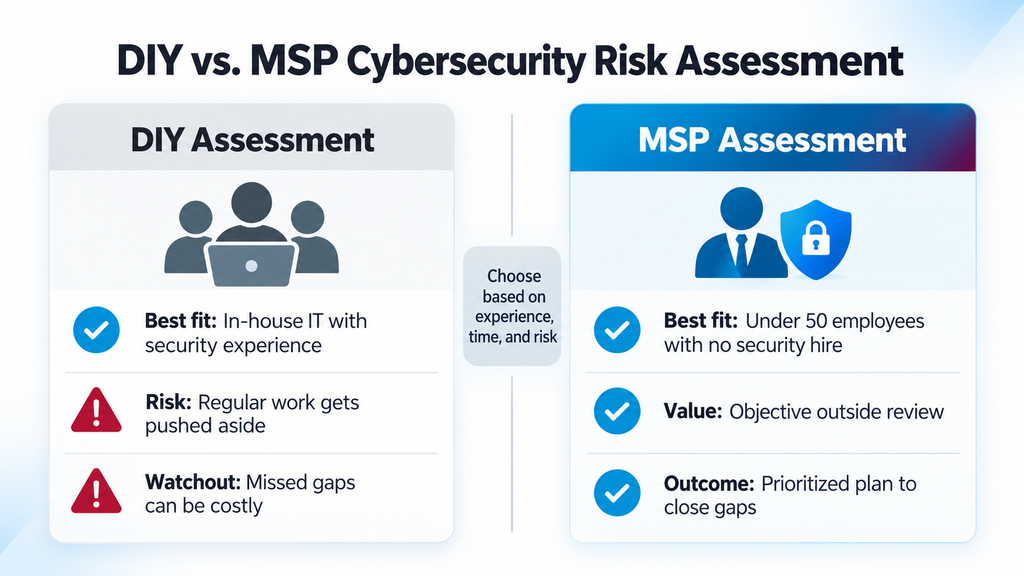
The way I’d put it to a client: a right-sized outside assessment gives you an objective, experienced look at your risk, from someone who does this for a living every day. How MSPs protect your business covers what that ongoing relationship looks like day to day.
What Does a Cybersecurity Risk Assessment Cost?
Pricing varies, but a basic assessment for a small business typically runs a few thousand dollars. A more thorough version, with penetration testing included, costs more. Many MSPs bundle an assessment into an ongoing managed IT agreement, so there’s no separate bill once you’re already a client.
Ask about this specifically before you sign anything, since it isn’t standard everywhere. Compare the cost either way against the numbers above: a breach that costs $10,000 to $100,000 in losses makes the assessment cheap by comparison, and that’s before counting the time your team spends recovering instead of running the business.
Cybersecurity Risk Assessment FAQs
It’s the process of identifying your assets, the threats against them, and the risks worth fixing first, ranked by potential damage. It’s a planning exercise that happens before any technical test or audit.
A few days for a small business with a handful of systems. Up to a few weeks for a company with multiple locations or regulated data to account for. An MSP already familiar with your environment usually moves faster than a first-time outside assessor.
A risk assessment finds and ranks what could go wrong. An audit checks whether you’re meeting a specific standard, like HIPAA, PCI, or ISO 27001. Most businesses need the assessment first, since it tells you what an audit should even be checking.
It depends on scope, but a basic assessment for a small business typically runs a few thousand dollars, and it’s often bundled into a managed IT agreement. See the cost section above for the full breakdown.
Yes. Small size doesn’t mean low risk, it often means fewer defenses already in place, which is part of why SMBs account for the majority of tracked breaches today. The federal government’s own small business cybersecurity guidance treats this as a baseline expectation for every business this size.
Get Your Cybersecurity Risk Assessed
Start with your assets, find what threatens them, fix the worst risks first, and put a date on your calendar to check again next year. That’s the whole process, whether you run it yourself or bring in help.
If you’d rather have someone else run it for you, Systems Integration’s cybersecurity services cover exactly this: a full assessment, a right-sized plan to close the gaps, and ongoing monitoring so you’re not doing it alone.